EdworthyMedia
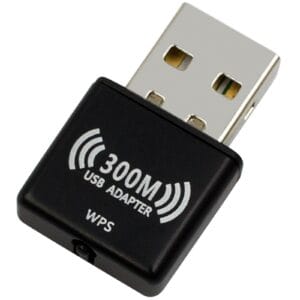
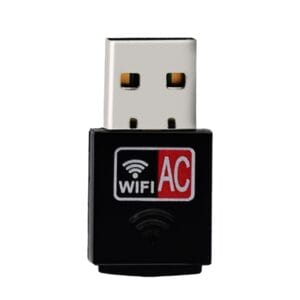
AC600 WiFi 5 Wireless USB Adapter (Bulk Packaged/Poly Bag) (AC600USB)
- Wi-Fi 5
- Weight: 0.1 kg
Anyone can buy from us online. You don't need a business account.Prices shown excluding VAT.


Code: VSG1080-K
Delivery and setup: The price shown is for this product supplied directly to you from our warehouse, without setup by Edworthy Media and Technology Limited. Setup is available at an additional cost. Please contact us before ordering for a quote including setup.
The VigorSwitch G1080 is a small, high-performance Gigabit smart switch designed for small and medium business networks that require simple network management, with support for VLANs, QoS and Link Aggregation (increases uplink speed for high data volume applications).
The G1080 is an ulta-low power device, consuming under 1A, even when fully loaded. It is powered by an AC/DC adaptor (included). It's a low cost device, ideal for adding additional Ethernet ports to your router with a small footprint.
The VigorSwitch G1080 can be managed directly through its web interface, or can be installed in conjunction with a compatible Vigor router to expand the router's network, with the VigorSwitch G1080 managed and monitored through the DrayTek Vigor router's web interface.
Power from USB If you have limited space or power sockets, the VigorSwitch G1080 can also be powered by USB - perhaps the USB port on PC or one on your DrayTek Vigor router
Central Management The DrayTek VigorSwitch G1080 can operate in standalone mode and be managed through its web interface or, if you need to manage and monitor the switch remotely, or have several DrayTek VigorSwitches to administer, you can centrally manage VigorSwitches on a site from the DrayTek router which they are physically connected to.
With DrayTek Central Switch Management, connected VigorSwitches can be monitored, managed and provisioned simply by accessing the router's web interface, either locally or from across the Internet.
See the 'Central Management' tab for more information on the capabilities of Central Switch Management.
Network Segmentation with Port-based & Tag-based VLAN The DrayTek VigorSwitch G1080 can separate network segments using IEEE 802.1q VLANs, with both Tag-based and Port-based VLANs:
Tag-based VLAN This type of VLAN can be used to segment networks using a single network link between the DrayTek Vigor router with multiple subnets (VLANs) and the VigorSwitch G1080, with different ports being assigned to each of the router's VLANs.
In this example, there are three VLANs being passed through the VigorSwitch G1080's first port, providing network ports to each of these networks. The clients on connected to each of these VLANs are isolated from each other, with access being controlled by the Vigor router's firewall.
DrayTek Central Switch Management can assist with configuring the VLAN settings on the VigorSwitch - see the 'VLAN Configuration' section of the 'Central Management' tab for more details.
Port-based VLAN This type of VLAN configures the VigorSwitch G1080 as two separate network switches, with some ports being assigned to each of these networks, but kept fully isolated from each other.
Prioritise traffic & ports with Quality of Service The VigorSwitch G1080 supports Quality of Service to prioritise latency sensitive traffic using both 802.1p CoS (Class of Service) and Port based mode.
802.1p CoS allows both software applications - such as Skype, and network devices - such as VoIP handsets that send priority tags with their time sensitive data, to be prioritised over general data transfers using the 4 flexible Queues and scheduling system of the switch.
With Port-based Quality of Service, VoIP phone handsets can be assigned a higher priority than a Network Attached Storage server, so that file transfers over the network cannot affect call quality.
Control port throughput with Rate Limiting The VigorSwitch G1080 can control the bandwidth available to each of its network switch ports, with the Ingress rate (data received on that port) and Egress rate (data sent from the switch to that port) being configurable in increments from 512 kilobits per second, 1 megabit per second, 2mbps, up to 512mbps and Unlimited.
Multicast IGMP Snooping With IGMP Snooping enabled, the VigorSwitch G1080 can determine which ports are requesting multicast data streams, with IP-TV for instance, and send that data only to the ports that have requested it, instead of the multicast streams being sent to all ports of the switch.
Link Aggregation / Port Trunking When connecting the VigorSwitch G1080 to a larger network switch such as the VigorSwitch G1280, the link between that switch and the G1080 could be a bottleneck for the devices communicating between those two switches. With Link Aggregation configured on both switches and two 1Gb/s network links between the two switches, traffic can be shared between the two ports, effectively doubling the bandwidth of the uplink and providing resilience should one of the links fail.
| Brand | Draytek |
|---|---|
| Product code | VSG1080-K |
| Weight | 0.55 kg |
| Shipping weight | 0.55 kg |
No. Anyone can buy from us online. You do not need a business account or to register, and you can check out as a guest. Business customers can view prices excluding VAT using the Home / Business switch at the top of the page.
This item is currently out of stock with our supplier. Call 01392 330 292 and we will check availability or recommend an alternative.
Yes. Our team can set up your device, including updates, email, software, data transfer, printers and Wi-Fi. Setup is quoted separately, so please call, WhatsApp or email us for a price.
Yes. Prices include VAT. Business customers can switch to prices excluding VAT using the Home / Business switch at the top of the page.
Yes. Change-of-mind returns are accepted, with return postage paid by the customer. If your order arrives damaged, please let us know within 7 days of delivery.
Tell us what you need the technology to do and we will help you choose the right specification, without the hard sell.